Usability features refer to the ease with which users can navigate the space and make sense of it. These design features are often used in creating any app. However, several educational apps and LMS systems were adopted from already existing systems originally designed for other purposes.
For instance, Google Classroom (GC). As useful and dynamic as GC is, a lot of the design for education is happening right now, post COVID-19 quarantine, as the scope was previously limited to using existing Google Apps and clubbing them together as G-Suite for Education with minimal functionality for on-site blended learning. However, the nuances that integrate teacher-work-flow or student-work-flow, especially for online learning, were never previously highlighted.
Need for Architectural Changes
In their paper, Actively Engaging Learners in Asynchronous Classes, Riggs and Linder (2016), note that learners have been taught how to navigate traditional brick-and-mortar classrooms and schools. For instance, the architecture of the main hall lets them know which direction to face. In my classroom, the placement of chairs informs my students if they will be working in small groups or facing me when they walk into my classroom. In contrast, they observe that often, “none of these architectural components exist ready-made in the online asynchronous environment.”
Therefore, Riggs and Linder suggest “a new architecture of engagement that functions in a virtual, asynchronous environment must be intentionally created.” This architecture should consider “determining and communicating expectations and policies clearly (Riggs & Linder, 2016).”
In addition, a 2009 paper by Panagiotis Zaharias called Usability in the Context of e-Learning, pushes us to consider building intrinsic motivation even in asynchronous environments.
“Learner-centered approaches put emphasis on the learner as an active participant at the center of the learning process with special interests and needs, intrinsic motivation, personal constructions of meaning and the need for self-regulation. Learning environments should foster intrinsically learning motivation.”
Panagiotis Zaharias (2009)
The basis for Zaharias’ usability design is the instructional design theory by John Keller. John Keller’s ARCS Model of Motivational Design lists Attention, Relevance, Confidence, and Satisfaction as components that drive intrinsic motivation in learners. Zaharias derives the following 5 web-usability elements to improve intrinsic motivation in asynchronous classes (Zaharias, 2009, pg 45).
Usability Design that Improves Self-Motivation
Zaharias’s Five Elements of Web Usability Design that Improves Motivation in Asynchronous Classes:
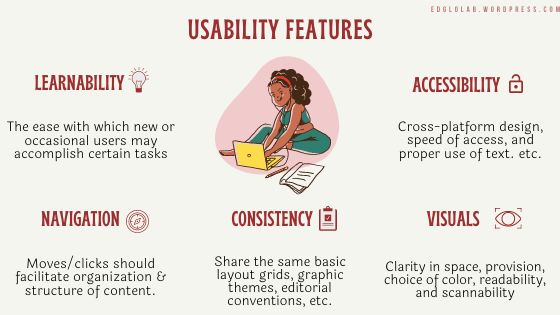
- Learnability: Users must be able to understand navigation options and to use them to locate wanted information. It is the “the ease with which new or occasional users may accomplish certain tasks”
- Accessibility: Cross-platform design, speed of access, and proper use of text are examples of accessibility
- Consistency: A consistent pattern of modular units that all share the same basic layout grids, graphic themes, editorial conventions, and hierarchies of organization. Design consistency is important to speed up the user’s learning.
- Navigation: Weston et al. (1999) define navigation as “how the student moves through the instruction and how the instruction is designed to facilitate understanding of organization and structure of content”.
- Visuals: While paying attention to the aesthetics on a website, we also need to consider 4 sections: space, provision, choice of color, readability, and scannability.
Google Classroom and Usability Design
At my school, we use G-Suite for Education and Seesaw as the primary platforms for our asynchronous learning. We do not have any additional integrated Learning Management System. Therefore, it was important for us to implement these design features in innovative and constructive ways to ensure our learners are able to follow along, find information easily, track their work, and communicate seamlessly.
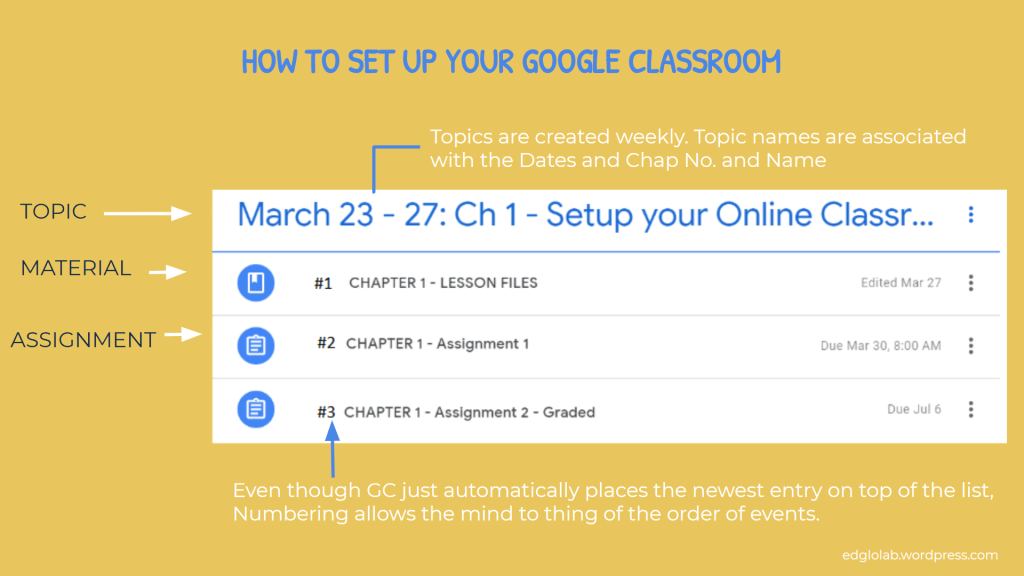
Having a protocol that mandates all teachers to use the same format in organizing their Google Classrooms will help with Learnability and Consistency.
Ex. Teachers can add instructions directly in the assignment or on Stream or on their Google Sites classroom blog. Learners now have to know which method each teacher will use for communication and check multiple sources. Instead, if the school has a mandated plan to communicate instructions, the consistency will promote learnability.
Google Classroom Samples
- Ms. Suchitra’s English Classroom
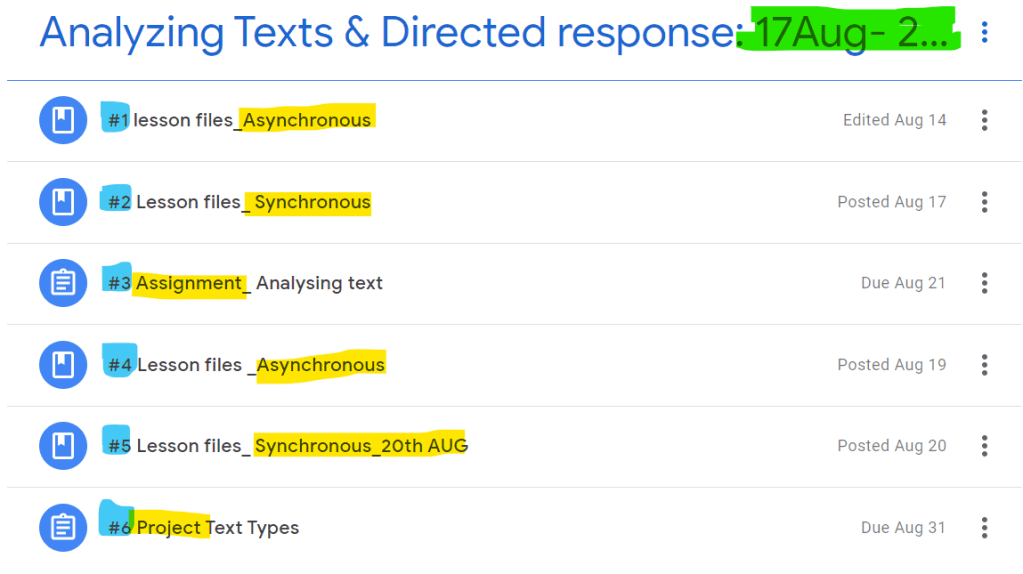
2. Janelle Scheckler’s Google Classroom
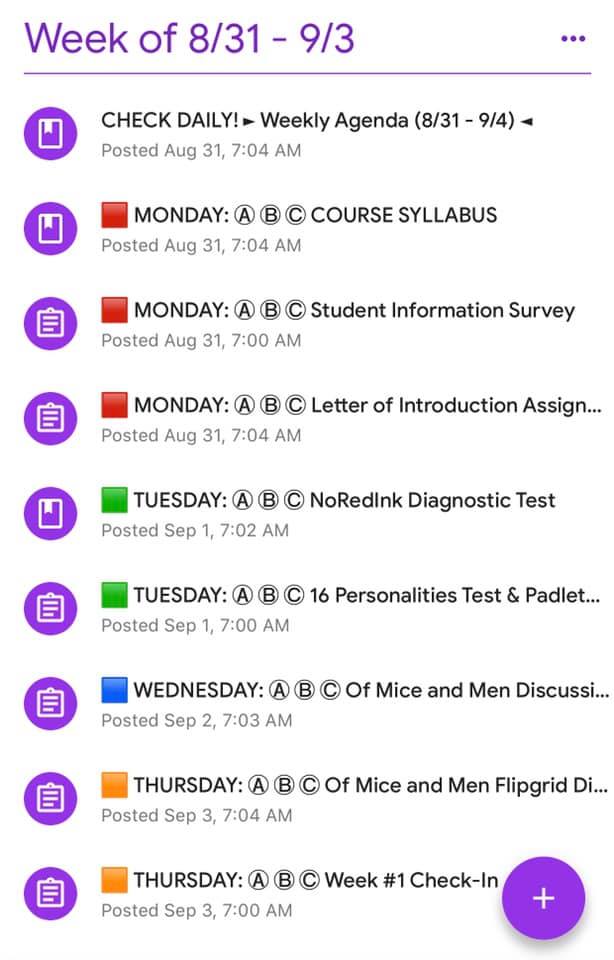
“I took people’s advice and labeled by day and used colored emojis (squares) to help students navigate the list of assignments.”
- Learnability and Consistency: Ex. CHECK DAILY!
- Navigation: Ex. Numbering or colour-coding system under each Topic.
- Visuals: Keep instructions short but clear. Follow a simple outline: expected learning outcome, how to submit the assignment, and a deadline.
- Accessibility: Keep Topic names short. We aware of how they would appear on a Phone or Tab.
One thing I realized is that it’s not enough to create these mandates or standards, I need to spend time introducing the systems to my learners and having them practice how to use the system over a period of 3 to 4 weeks. This builds routines and helps achieve all 5 web usability design criteria.
REFERENCES
Riggs, S. and Linder, K. (2016). Actively Engaging Students in Asynchronous Online Classes. IDEA. Paper #64. Retrieved on Aug 30, 2020 from https://eric.ed.gov/?id=ED573672#:~:text=Riggs%2C%20Shannon%20A.%3B%20Linder,each%20other%2C%20in%20real%20time.
Zaharias, P. (2009) Usability in the Context of e-Learning: A Framework Augmenting ‘Traditional’ Usability Constructs with Instructional Design and Motivation to Learn. International Journal of Technology and Human Interaction, 5(4), 38-61 Oct-Dec. Retrieved on Aug 30, 2020 from https://www.researchgate.net/publication/220672996_Usability_in_the_Context_of_e-Learning_A_Framework_Augmenting_’Traditional’_Usability_Constructs_with_Instructional_Design_and_Motivation_to_Learn
Scheckler, J. (2020, Sep 6). Teachers Using Google Classroom [Facebook page]. Facebook. Retrieved Sep 17, 2020 from Home [Facebook page]. Facebook. Retrieved January 12, 2020 from https://www.facebook.com/groups/teachersusinggoogleclassroom/permalink/2759596287693761
Navaratnam, S. (2020, Aug). Google Classroom.

